TL;DR
UiPath is the right choice for organizations that need deep process mining, legacy desktop automation, and enterprise-scale intelligent document processing in regulated industries. Odin AI is the right choice for organizations that need AI agents for knowledge work, fast deployment, and business-user ownership — at a fraction of the cost. Many enterprises use both.
If you're evaluating a UiPath alternative, you're at a decision point that matters. Your current automation approach isn't delivering the ROI you projected. Implementation costs keep climbing. Your RPA bots break every time someone updates a UI. And you're watching competitors deploy AI-native solutions while your team manages a fragile RPA platform built on brittle desktop automation scripts.
According to Forrester Research, over 60% of RPA implementations fail to meet their original business case — not because the technology doesn't work, but because the Construction Model of enterprise automation (buy the platform, hire the developers, build for months, maintain forever) creates a cost and complexity ceiling that most organizations hit before they reach scale.
This comparison gives you a detailed, honest look at Odin AI and UiPath — covering total cost of ownership, process mining and process intelligence capabilities, document processing depth, workflow automation breadth, desktop automation reality, and precise use case suitability. We also examine where Microsoft Power Automate fits in the picture, since they appear constantly when business users explore the broader UiPath alternatives landscape.
The Core Difference: Construction Model vs. Turnkey Model
Before the tables and feature lists, here's the framing that shapes everything else in this comparison.
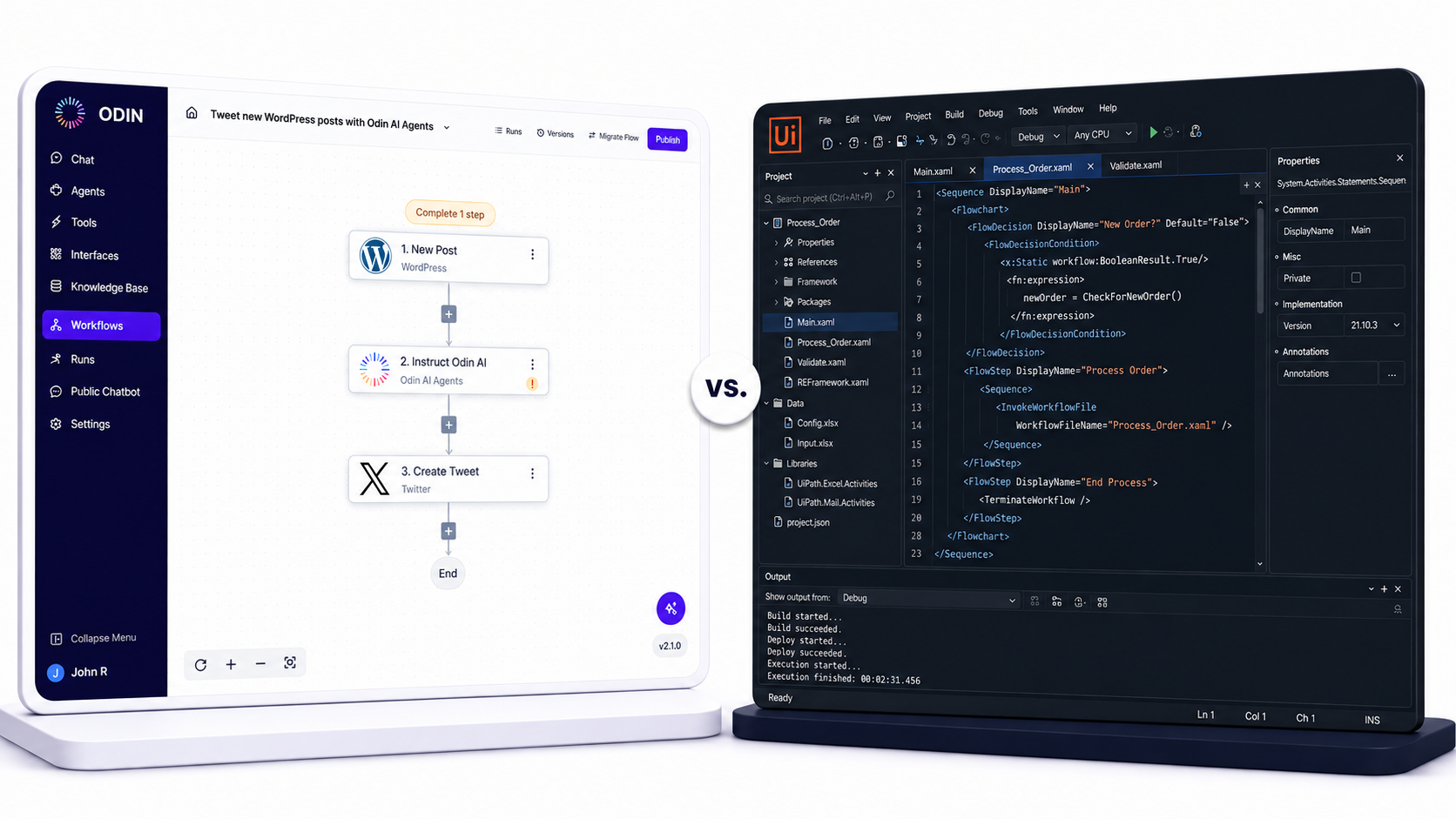
UiPath Is a Construction Model
You're buying raw materials and hiring contractors. Implementing UiPath as an RPA platform at scale requires certified RPA developers, lengthy scoping phases for process automation, custom bot architecture for each workflow, and dedicated maintenance teams. UiPath is powerful — but the power is locked behind significant implementation costs and specialized expertise.
Enterprise customers routinely spend $150,000–$400,000 before a single production workflow is live, fully loaded across platform license, developer talent, infrastructure, and implementation services. Gartner estimates that the average enterprise RPA deployment takes 5.5 months from contract to first production bot.
UiPath's strength is also its constraint: it was built primarily for desktop automation of legacy systems, and its process intelligence and process mining features are genuinely world-class. But those capabilities assume you have an RPA Center of Excellence, a team of certified developers, and 6+ months for deployment.
Odin AI Is a Turnkey Model
You're buying a finished, configured system. Odin AI is an AI Growth Accelerator that lets operations managers, sales leaders, HR teams, and business users deploy AI agents without writing code. Starting around $15,000, teams are live in 1–7 days. The intelligence is built in; you configure it, not construct it. Workflow automation happens through a no-code visual builder, not through developer sprints.
That single distinction — construction vs. turnkey — is the lens through which every comparison below should be read.
Pricing Comparison: The Total Cost of Reality
Sticker price almost never reflects what you'll actually spend on enterprise automation tools. Here is a realistic TCO breakdown for a mid-market company (~500 employees) deploying workflow automation across 3–5 workflows in Year 1.
Total Cost of Ownership — Year 1 Estimate
| Cost Category | Odin AI | UiPath |
|---|---|---|
| Platform License | ~$15,000 | $15,000–$60,000+ |
| Implementation / Setup | Included in Turnkey | $50,000–$150,000+ |
| Developer / RPA Talent | Not required | $80,000–$150,000/yr |
| Training & Certification | Minimal (business users) | $2,000–$10,000/person |
| Infrastructure (hosting, bots) | Cloud-native, included | $10,000–$30,000+ |
| Process Mining Add-On | Not applicable | $25,000–$100,000+ |
| Ongoing Maintenance | Low (no-code updates by business users) | High (developer-dependent sprint cycles) |
| Time to First Deployment | 1–7 days | 3–6 months |
| Estimated Year 1 Total | $15,000 (2 AI Employees) | $150,000–$400,000+ |
Estimates based on publicly available pricing, Forrester Research automation cost benchmarks, Gartner analyst reports, and industry data.
Process Mining and Process Intelligence: Where UiPath Leads
Let's be direct: process mining and process intelligence are UiPath's crown jewel differentiators. If your organization needs deep process intelligence capabilities at enterprise scale, UiPath has a genuine and significant advantage that no honest review should minimize.
What Is Process Mining?
Process mining is the discipline of extracting objective, data-driven insights about how business processes actually execute — based on raw data from event logs, not documentation.
By analyzing event logs from ERP systems, CRMs, and operational databases, process mining tools reconstruct actual process flows, identify bottlenecks, measure deviations from intended workflows, and surface automation opportunities. Process intelligence goes further: it continuously monitors live processes, flags anomalies in real time, and provides prescriptive recommendations.
According to Gartner, the process mining market is expected to reach $5.3 billion by 2025, driven by enterprise demand for objective process visibility before automation investment.
UiPath's Process Mining and Process Intelligence Capabilities
- Process mining from raw data: UiPath ingests raw data from ERP systems, CRMs, and operational databases to reconstruct actual process flows. The process intelligence layer turns raw data into visual process maps showing exactly how work moves through your organization — including every variant, delay, and deviation.
- Conformance checking: UiPath's process intelligence tools compare actual process execution against designed process flows, flagging deviations, delays, and compliance risks. This is especially valuable in regulated industries where process adherence is auditable by external regulators.
- Process discovery for automation candidates: UiPath uses process mining to identify which workflows are strong candidates for desktop automation or RPA bot deployment — based on volume, repetitiveness, and rule-consistency surfaced from the raw data analysis.
- Task mining: UiPath's task mining technology captures how employees interact with desktop applications at the keystroke level, building a precise map of manual workflow automation candidates.
- Process intelligence for ROI measurement: UiPath's process intelligence capabilities let enterprise customers measure actual before-and-after ROI of deploying RPA bots — connecting process mining baselines to quantified automation outcomes.
For enterprise customers in manufacturing, financial services, claims processing, insurance, and regulated industries where process intelligence is a strategic discipline, UiPath's process mining suite is a compelling differentiator that Odin AI does not match.
Odin AI and Process Mining
Odin AI does not have native process mining or process intelligence capabilities. It is not the right choice if process mining is a primary requirement. UiPath owns process mining. Odin AI owns no-code AI agent deployment. A fair comparison acknowledges both.
Document Processing and Intelligent Document Processing
UiPath on Document Processing
UiPath's dedicated Intelligent Document Processing (IDP) module is built for high-volume, structured document processing — insurance claims processing, invoice processing at scale, and contract data extraction. UiPath's IDP combines OCR, machine learning classifiers, and template-based extraction to process structured and semi-structured documents with high accuracy.
Odin AI on Document Processing
Odin AI's document processing is RAG-based. Rather than extracting structured fields from templated documents, Odin AI's knowledge base ingests documents and makes them queryable in natural language — ideal for legal research, HR policy queries, and support resolution from product documentation.
| Document Processing Scenario | Odin AI | UiPath |
|---|---|---|
| Natural language Q&A over documents | Strong | Limited |
| Structured field extraction (invoices, claims) | Limited | Strong |
| Claims processing at volume | ||
| Policy document Q&A for employees | Strong | |
| Legal research across document libraries | Strong | |
| Unstructured knowledge synthesis | Strong |
Desktop Automation and Browser Automation
UiPath's desktop automation layer is the most mature in the RPA tools market — automating virtually any Windows application including thick-client ERPs, legacy terminal emulators, and custom internal applications. Browser automation extends this to web interfaces with the same reliability.
Odin AI is not an RPA platform and does not offer desktop automation or deep browser automation capabilities. It connects to modern SaaS tools via APIs and webhooks. If your requirement involves legacy systems accessible only through desktop application interaction, Odin AI is not the right tool.
Full Feature-by-Feature Comparison
Core Workflow Automation and AI Capabilities
| Feature | Odin AI | UiPath |
|---|---|---|
| No-Code Workflow Automation Builder | Full visual builder, business users | Requires RPA developer / UiPath Studio |
| AI Agent Deployment | Native, multi-agent orchestration | Via UiPath Autopilot (emerging) |
| RAG Knowledge Base | Built-in, any document format | Not native |
| Process Mining | Industry-leading | |
| Process Intelligence Capabilities | Strong | |
| Desktop Automation | Industry-leading | |
| Browser Automation | Limited (API-first) | Strong |
| Intelligent Document Processing | RAG-based (unstructured) | Dedicated IDP (structured) |
| Conversational AI / Chatbot Builder | Full built-in Chatbot Builder | Via third-party integration |
| Meeting AI / Notetaker | Included natively | Not available |
| Multi-Agent Orchestration | Visual, no-code | Requires custom development |
| Task Mining | ||
| Automating Workflows (business users) | Core strength | Developer-dependent |
Deployment, Cost, and Operations
| Factor | Odin AI | UiPath |
|---|---|---|
| Deployment Time | 1–7 days | 3–6 months |
| Required Technical Skills | None — business users | Certified RPA developers |
| Implementation Costs | $15,000 (2 AI Employees) | $50,000–$150,000+ |
| Platform License | ~$5,000/yr | $15,000–$60,000+/yr |
| Ongoing Maintenance | Business users (no-code) | Developer-dependent |
| Cloud-Native | Yes | Hybrid (cloud + on-prem options) |
| Enterprise SSO / SCIM | ||
| Audit Logs | ||
| SOC 2 / GDPR Compliance |
How Odin AI Compares to Microsoft Power Automate
Odin AI vs. Microsoft Power Automate
Microsoft Power Automate is a workflow automation tool embedded in the Microsoft ecosystem. It covers two tiers: cloud-based workflow automation (comparable to Zapier) and Power Automate Desktop for RPA-style automation within the Microsoft ecosystem.
Where Microsoft Power Automate wins: Deep Microsoft ecosystem integration, bundled pricing with Microsoft 365, and broad connector library for Microsoft tools (Teams, SharePoint, Outlook, Dynamics).
Where Microsoft Power Automate falls short: No native AI agent deployment. No multi-agent orchestration. No RAG knowledge base. No process mining. Automation is largely rule-based and connector-dependent.
| Capability | Odin AI | Microsoft Power Automate | UiPath |
|---|---|---|---|
| AI Agent Deployment | Native | Emerging | |
| No-Code Builder | Full | Partial | Developer IDE |
| Process Mining | Industry-leading | ||
| Microsoft Ecosystem Integration | API-based | Native | Strong |
| RAG Knowledge Base | |||
| Multi-Agent Orchestration | |||
| Desktop Automation | Limited | Industry-leading | |
| Deployment Time | 1–7 days | Days (simple flows) | 3–6 months |
| Implementation Cost | $15,000 (2 AI Employees) | Bundled with M365 | $150,000–$400,000+ |
For teams choosing between all three: Microsoft ecosystem automation → Power Automate; legacy desktop automation and process intelligence → UiPath; AI-native knowledge work automation → Odin AI.
Pros and Cons: Honest Assessment
Odin AI
Pros: Dramatically lower implementation costs, business-user ownership, AI-native architecture, multi-agent orchestration, unified platform (knowledge base + chatbot + notetaker + automator), fast deployment (days, not months), no developer hiring required.
Cons: No process mining or process intelligence capabilities, no desktop automation for legacy systems, not designed for high-volume unattended transactional RPA, limited browser automation compared to UiPath.
UiPath
Pros: Industry-leading process mining and process intelligence, mature desktop automation for legacy systems, enterprise-scale unattended bot infrastructure, strong IDP for structured documents, large developer ecosystem and certification program.
Cons: High implementation cost ($150,000–$400,000+ Year 1), requires specialized RPA developers, long deployment timelines (3–6 months average), developer-dependent maintenance, not designed for business-user ownership, limited native AI agent capabilities.
Use Case Suitability
Choose Odin AI if…
- You're a mid-market company (50–2,000 employees) needing fast automation results
- Your automation targets knowledge work — customer support, sales follow-up, HR queries, legal research
- You need business users to own and update their own AI workflows without developer dependency
- Budget constraints make $150,000+ Year 1 implementation cost prohibitive
- Speed to production matters — you need results in days, not quarters
- You want an AI-native platform built for conversational interfaces and unstructured documents
Choose UiPath if…
- You need deep process mining and process intelligence capabilities
- Your automation requires interacting with legacy desktop applications and thick-client ERPs
- You process high volumes of structured documents (invoices, claims, contracts at scale)
- You're in a regulated industry where process conformance and audit trails are regulatory requirements
- You have or plan to build an RPA Center of Excellence
- You need unattended bot infrastructure for millions of transactional RPA runs per month
Use Case Matrix
| Automation Scenario | Best Platform |
|---|---|
| AI agent for customer support queries | Odin AI |
| Lead qualification and sales follow-up automation | Odin AI |
| HR onboarding and policy Q&A | Odin AI |
| Legal research and document synthesis | Odin AI |
| RAG-based knowledge base for employees | Odin AI |
| Process mining from ERP event logs | UiPath |
| Desktop automation of legacy SAP/Oracle | UiPath |
| Invoice processing at enterprise volume | UiPath |
| Claims processing in regulated industries | UiPath |
| Task mining for bot candidate discovery | UiPath |
| Basic Microsoft 365 workflow automation | Microsoft Power Automate |
| Teams and Outlook integration workflows | Microsoft Power Automate |
Why Teams Are Switching to Odin AI as a UiPath Alternative
The organizations searching for a UiPath alternative typically share a recognizable story:
- Launched an RPA program 2–3 years ago with executive sponsorship
- Underestimated implementation costs — the platform license was the smallest line item
- Deployed 3–5 bots that required constant maintenance as UIs changed
- Realized the promised ROI required 10× more bots, 10× more developers, and 10× more time
- Now evaluating whether the Construction Model was the right architecture for their actual automation needs
These teams aren't abandoning automation — they're recognizing that different automation problems require different tools. The knowledge work automation they actually need (customer-facing AI agents, internal Q&A bots, sales automation, HR self-service) is better served by an AI-native platform than by an RPA platform extended upward into AI.
Odin AI's Turnkey Model collapses the implementation cycle from months to days and from $150,000+ to $15,000. For organizations that need AI automation results quickly, without building an RPA Center of Excellence, that distinction is decisive.
Ready to See the Difference?
An Odin AI solutions engineer will build an AI agent for your specific workflow automation requirement live on the call.
Compare plans and get a TCO estimate against your current or planned RPA platform spend.
Deploy your first AI agent today — no implementation costs, no developer required.
Sources
- Forrester Research (2023). The Total Economic Impact of RPA: Enterprise Deployment Benchmarks.
- Gartner (2024). Magic Quadrant for Robotic Process Automation. gartner.com
- Gartner (2023). Market Guide for Process Mining Tools.
- McKinsey Global Institute (2023). The economic potential of generative AI: The next productivity frontier.
- IDC (2024). Worldwide Intelligent Process Automation Market Guide.
- UiPath (2024). UiPath Platform Pricing and Editions. uipath.com
- Microsoft (2024). Power Automate Documentation and Licensing. microsoft.com
Odin AI is an AI Growth Accelerator for enterprise teams. Learn more at getodin.ai. Pricing estimates are based on publicly available information as of 2025. UiPath, Microsoft Power Automate, and all other brand names mentioned are trademarks of their respective owners.
Still have questions?
Get a live demo with an Odin AI solutions engineer — they'll build an AI agent for your specific workflow on the call.
Book a Demo