

TL;DR
You don't need a software engineering degree to put AI to work for your business. Today, platforms like Odin AI make it possible for operations managers, sales leaders, and HR professionals to build AI agents without coding — in days, not months. The future belongs to teams that deploy AI agents today. Gartner projects that by 2026, more than 80% of enterprises will have deployed AI-enabled applications or models.
You don't need a software engineering degree to put AI to work for your business. Today, platforms like Odin AI make it possible for operations managers, sales leaders, and HR professionals to build AI agents without coding — in days, not months. The no code AI revolution has fundamentally changed what's possible for non-technical teams.
According to a 2023 McKinsey Global Institute report, generative AI could automate work activities that absorb 60–70% of employees' time — yet most businesses haven't deployed a single AI agent. The bottleneck isn't AI capability. It's the assumption that building AI agents requires software engineers.
That assumption is now obsolete.
This guide walks you through exactly how to build an AI agent from scratch: from identifying your first use case to deploying a fully functional AI agent that handles real work. Whether you're looking to automate customer support, streamline onboarding, or accelerate sales follow-ups, this step-by-step tutorial will get you there — without writing a single line of code.
The future belongs to teams that deploy AI agents today. Gartner projects that by 2026, more than 80% of enterprises will have deployed AI-enabled applications or models. The teams building AI agents now are establishing leads their competitors will struggle to close.
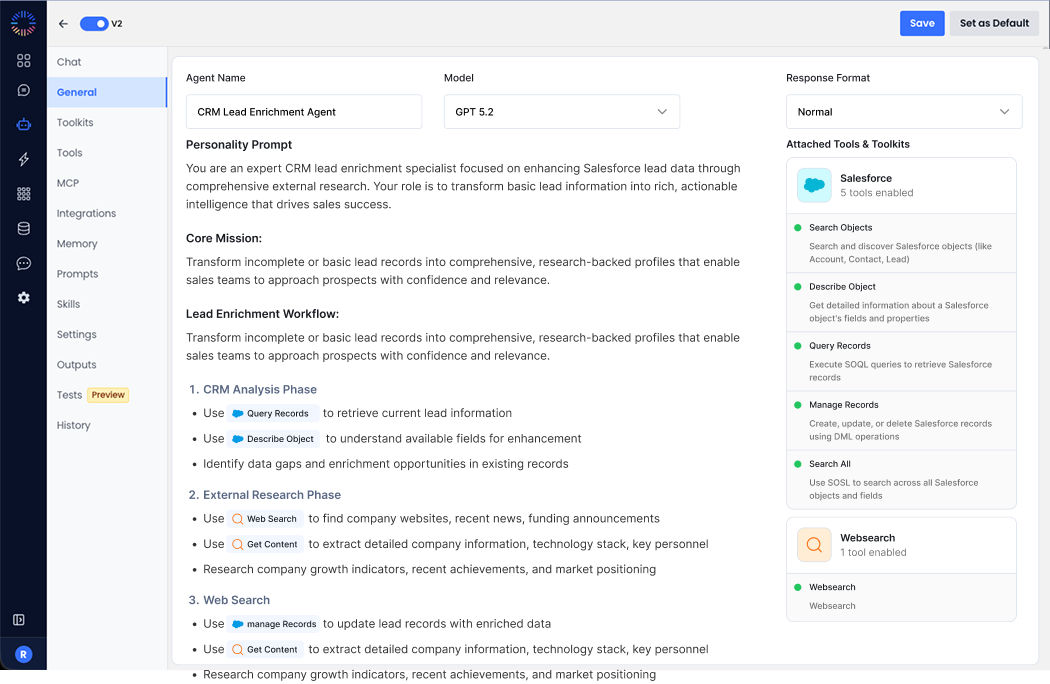
What Is a No Code AI Agent?
A no code AI agent is an autonomous software program that carries out tasks, makes decisions, and interacts with users or systems — configured entirely through a visual interface, with no programming required.
Think of it as hiring a digital team member who works 24/7, never forgets a step, and scales instantly across your entire organization. Unlike traditional automation scripts that follow rigid rules, a no code AI agent understands natural language, adapts to context, and learns from your business documents.
Traditional AI agent development required Python expertise, API integrations, and months of custom development. Building AI agents the old way meant hiring engineers at $150,000+ per year, managing complex deployments, and writing thousands of lines of configuration just to handle a simple workflow. Platforms like Odin AI have flipped that model entirely.
With a no code builder, you describe what you want the AI agent to do, connect your data sources, and deploy. No code AI has democratized access to powerful AI agents for every business function — not just the teams that can afford a developer.
Who can build an AI agent with no code tools today?
- Operations managers eliminating manual workflows
- Sales teams automating lead qualification and follow-up
- HR leaders streamlining onboarding and policy queries
- Customer support managers reducing ticket volume
- Finance teams handling invoice processing and expense queries
- Legal teams accelerating legal research and contract review
Why Build AI Agents Without Coding?
Building AI agents without coding isn't just a convenience — it's a competitive advantage with measurable ROI. Here's why no code AI agent development has become the default choice for forward-thinking businesses:
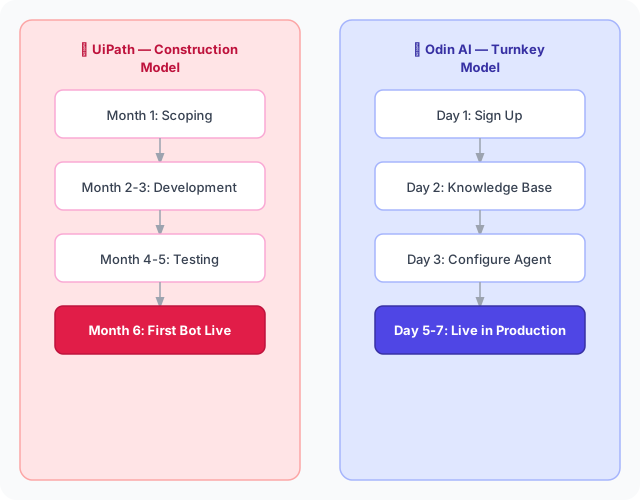
Speed to value: Deploy a new AI agent in 1–7 days instead of 3–6 months. A Stanford and MIT study found that workers using AI tools complete tasks 25% faster with no drop in quality. No code AI collapses the deployment cycle from quarters to days.
Cost efficiency: Odin AI's Turnkey Model starts at ~$15,000 — a fraction of the $150,000+ that traditional enterprise automation implementations typically cost in Year 1. When you build an AI agent without code, you eliminate developer hiring, training, and maintenance overhead entirely.
Business ownership: Your team controls and updates the AI agent without waiting on a developer sprint. When business logic changes, you update the AI agent immediately — no ticket queue, no sprint cycle, no delay.
Scale without proportional cost: Traditional automation scales by adding bots and developers. No code AI tools let you build multiple agents simultaneously, reusing knowledge bases and AI workflows, without adding headcount.
Accessibility for domain experts: The people who best understand a business process are rarely developers. No code AI puts building AI agents in the hands of the people who actually know the work — producing better, more contextually accurate AI agents than developer-built ones.
Key stat: According to IDC, organizations that deploy AI automation report an average 40% reduction in time spent on repetitive operational tasks within the first 12 months. That's the ROI case for building AI agents now.
The Building Blocks of a Powerful AI Agent
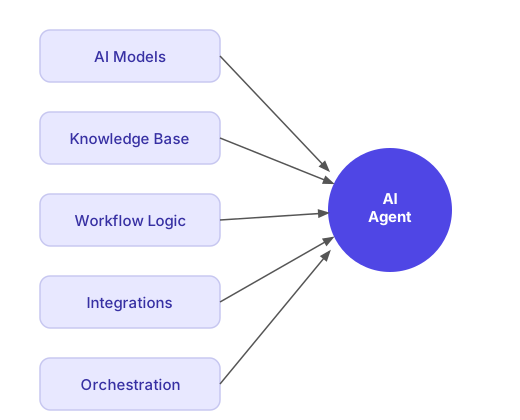
Before you build an AI agent, it helps to understand what's inside one. Every powerful AI agent is composed of five core components:
- AI Models — The intelligence engine. Large language models (LLMs) power your AI agent's reasoning, language understanding, and response generation. Odin AI connects to top-tier AI models so you don't manage that infrastructure yourself.
- Knowledge Base — The AI agent's memory. A good AI agent doesn't rely on generic AI models alone — it pulls from your specific business documents via Retrieval-Augmented Generation (RAG), giving it accurate, grounded answers.
- Workflow Logic — The decision-making framework. This is where business logic lives: what the AI agent does first, what conditions trigger which responses, when it escalates to a human.
- Integrations — How the AI agent connects to your existing tools: CRM, helpdesk, communication platforms, and databases. Integrations are what make AI workflows span your entire tech stack.
- Orchestration — How multiple agents coordinate. Multi agent systems let you run complex workflows by distributing tasks across specialized AI agents that hand off work to each other seamlessly.
How to Build AI Agents Without Coding: 10-Step Guide
Step 1: Define the Problem Your AI Agent Will Solve
Start with a specific business problem, not a vague goal. The most powerful AI agents are narrowly focused — one job, done exceptionally well. When you're building AI agents for the first time, resist the urge to build an AI agent that does everything.
High-value first AI agent use cases:
- "Our sales team spends 3 hours a day manually qualifying inbound leads"
- "HR receives the same 15 onboarding questions from every new hire"
- "Our support team manually triages 200+ tickets per day before routing them"
- "Legal research for contract review takes 4+ hours per document"
- "Our ops team re-enters data between systems that should talk to each other"
Pre-build questions to answer:
- What specific task will the AI agent automate?
- Who interacts with the AI agent — employees, customers, or both?
- What data does the AI agent need access to?
- What business logic governs the AI agent's decisions?
- What does the AI agent do when it can't resolve something?
The best AI workflows target high-volume, repetitive tasks where the business logic is well-defined. If your team handles a task more than 20 times per day, an AI agent can handle it instead — freeing people for work that requires genuine human judgment.
Step 2: Sign Up for Odin AI and Explore the No Code Builder
Head to getodin.ai and create your account. Odin AI is an enterprise-grade AI Growth Accelerator built specifically for teams that want to build powerful AI agents without writing code.
Once you're in, you'll land on the main dashboard — your command center for building, deploying, and monitoring AI agents. The interface is a visual builder that lets you construct complex workflows through a drag and drop interface. If you can use a spreadsheet, you can use this no code builder.
What you'll find in the Odin AI no code builder:
- Agent Builder — the core no code builder for creating individual AI agents
- Automator — build AI workflows that connect multiple steps and systems
- Chatbot Builder — create conversational AI agents for customer-facing use cases
- AI Notetaker — an AI agent that joins meetings and captures structured notes automatically
- Knowledge Base — the RAG-powered document intelligence layer for all your AI agents
Try it free: getodin.ai/signup
Step 3: Choose Your AI Agent Type and Template
Odin AI offers pre-built AI agent templates across core business functions. These templates give you a running start — pre-loaded with business logic, AI workflows, and proven prompts that you customize rather than build from scratch.
| Business Function | Example AI Agent Templates |
|---|---|
| Sales | Lead qualification AI agent, outreach follow-up AI agent |
| Customer Support | Ticket triage AI agent, FAQ resolution AI agent |
| HR | Onboarding assistant AI agent, policy Q&A AI agent |
| Operations | Process automation AI agent, data extraction AI agent |
| Finance | Invoice processing AI agent, expense query AI agent |
| Legal | Legal research AI agent, contract review AI agent |
Select the template closest to your use case. Building AI agents from templates inherits proven AI workflows — saving hours of configuration time before your first conversation.
Creating a new AI agent from scratch: If no template fits, the no code builder lets you create AI agents from a blank canvas using the visual workflow builder — defining purpose, business logic, and data connections without any code AI scripting.
Step 4: Upload Your Knowledge Base
This is where your AI agent goes from generic to genuinely useful. Odin AI includes a RAG-based knowledge base — your AI agent answers questions by pulling from documents you upload, grounded in your actual business reality, not just general AI models.
This is what separates a powerful AI agent that knows your business from a generic chatbot that hallucinates. The knowledge base is the single biggest driver of AI agent quality on day one.
What to upload for your AI agent's knowledge base:
- Product documentation and FAQs
- HR policy documents and employee handbooks
- Sales playbooks and objection-handling guides
- Support runbooks and resolution guides
- Process SOPs and workflow documentation
- Legal research references and contract templates
- Pricing guides and competitive battlecards
How to populate your AI agent's knowledge base:
- Navigate to Knowledge Base in the sidebar
- Click Upload Documents
- Drag and drop PDFs, Word docs, Excel files, or paste text directly
- Tag documents by department or topic for cleaner retrieval
- Set visibility permissions per document
Odin AI automatically indexes uploaded content and makes it available to your AI agent in real time. No manual tagging required beyond department-level organization.

Step 5: Configure Your AI Agent's Behavior and Business Logic
Now you define how your AI agent thinks, responds, and decides. In Odin AI's visual builder, this happens through a configuration panel — no code AI scripting required.
Key configuration settings for your AI agent:
- Persona and tone: Define how the AI agent presents itself — formal, conversational, brand-aligned. Name it. Give it a role description.
- Response boundaries: Set what the AI agent will and won't answer. Scope it to your domain so it doesn't go off-topic.
- Escalation rules: Define exactly when the AI agent hands off to a human — by confidence threshold, topic, or user request.
- Fallback behavior: What happens when the knowledge base doesn't have an answer? Route to human, create a ticket, or acknowledge the gap.
- Language and localization: Configure multi-language support if your team or customers operate across regions.
Step 6: Set Up Integrations to Power Your AI Workflows
Your AI agent becomes dramatically more powerful when connected to the tools your team already uses. Odin AI connects natively to the most common business platforms, creating AI workflows that span your entire tech stack.
Native integrations for your AI agent's workflows:
- CRM: Salesforce, HubSpot — read and write contact records, log activities, trigger sequences
- Communication: Slack, Microsoft Teams, email — deploy AI agents where your team actually works
- Helpdesk: Zendesk, Freshdesk, Intercom — integrate AI agents into existing support workflows
- Databases: Airtable, Google Sheets, SQL — read structured data to inform AI agent responses
- Calendars: Google Calendar, Outlook — enable AI agents to schedule meetings autonomously
- Document storage: Google Drive, SharePoint, Dropbox — sync documents to the knowledge base automatically
Integration is where AI workflows become end-to-end automation rather than isolated chatbots. An AI agent that can read from your CRM, write back to it, and trigger follow-up sequences is a different category of tool than one that only answers questions.
Step 7: Build Complex Workflows with Multi Agent Systems
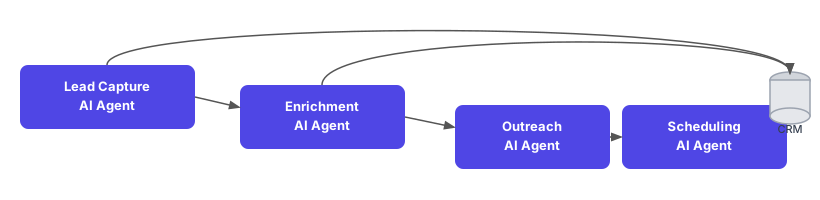
Here's where Odin AI goes far beyond a simple chatbot. For workflows that span multiple steps, decisions, and systems, you can deploy multi agent systems — teams of specialized AI agents coordinating through automated AI workflows.
Multi agent systems are what make end-to-end automation of genuinely complex business processes possible without code.
Example multi agent workflow — sales pipeline automation:
- Intake Agent monitors the website form and enriches new leads
- Qualification Agent scores leads against ICP criteria and segments by tier
- Outreach Agent drafts and sends personalized follow-up sequences
- Scheduling Agent books demos for qualified leads directly into the sales rep's calendar
- Handoff Agent creates the CRM record and briefs the sales rep with a meeting prep summary
All of this runs without a single human touch — until the sales rep joins the call with a warm, briefed prospect.
Step 8: Test Your AI Agent Thoroughly
Before going live, run your AI agent through real-world scenarios. This is the step where good AI agents become great ones.
AI agent testing checklist:
- Sandbox testing: Use Odin AI's built-in test environment to simulate real conversations before deployment
- Edge cases: Test what happens when users ask questions outside the AI agent's scope
- Escalation paths: Confirm that handoff to human works correctly in every scenario
- Knowledge retrieval: Ask 10–20 real questions your users would ask — verify answers are accurate and sourced from your documents
- Tone and persona: Review 20+ test responses to confirm consistency with your brand voice
- Integration tests: For each connected system, confirm data flows correctly in both directions
Step 9: Deploy Your AI Agent Across Your Channels
Odin AI's no code builder offers multiple deployment options so your AI agent meets users where they already are.
AI agent deployment channels:
- Embedded web widget — paste a JavaScript snippet; the AI agent appears as a chat interface on any webpage
- Slack bot — deploy as a Slack workspace bot; employees interact via direct message or channel mention
- Microsoft Teams bot — same pattern for Teams-first organizations
- API endpoint — for custom integrations, Odin AI exposes a REST API so your developers can call the AI agent from any system
- Email integration — AI agent monitors an inbox and responds to inbound queries automatically
- SMS / WhatsApp — for customer-facing use cases requiring mobile channels
Step 10: Monitor, Learn, and Scale Your AI Agents
Post-launch is where the ROI of your AI agents compounds. Building powerful AI agents is a continuous improvement cycle — not a one-time deployment.
Odin AI's analytics dashboard shows you:
- Conversation volume: How many interactions your AI agent is handling per day/week/month
- Resolution rate: % of queries fully resolved without human escalation
- Escalation triggers: Which question types most frequently exceed the AI agent's confidence threshold
- Knowledge gaps: Topics where the AI agent consistently can't find an answer — these are your next knowledge base uploads
- User satisfaction: If you've enabled rating prompts, track sentiment over time
Use this data to improve the AI agent systematically: add documents to the knowledge base, refine escalation rules, build new agents for high-escalation topics. Each improvement compounds — better AI agents reduce escalation rates, which increases the ROI of deploying more agents.
What Makes Odin AI Different from Other No Code AI Tools?
Most no code automation tools — Zapier, Make, n8n — are workflow builders. They execute deterministic if-this-then-that logic. They aren't building AI agents. They don't understand context, they can't conduct legal research, and they don't support multi agent systems.
Odin AI is purpose-built for building AI agents. That distinction matters.
| Capability | Odin AI | Zapier / Make / n8n | Custom Development |
|---|---|---|---|
| AI Agent Intelligence | Native LLM + RAG | Rule-based only | Custom-built |
| No-Code Builder | Full visual builder | Workflow automation | Developer required |
| RAG Knowledge Base | Built-in | Custom-built | |
| Multi-Agent Orchestration | Visual, no-code | Custom-built | |
| Deployment Time | 1–7 days | Hours (simple flows) | 3–6 months |
| Business User Ownership | Full control | Partial | Developer-dependent |
| Enterprise Security | SOC 2, GDPR, HIPAA | Varies | Custom |
| Implementation Cost | $15,000 (2 AI Employees) | $40,000+ | $150,000+ |
Real-World AI Workflows Built on Odin AI
AI Workflows for Sales Teams
A SaaS company builds an AI agent that monitors their website form, qualifies every inbound lead against ICP criteria, enriches the contact record in Salesforce, scores the lead, and either books a demo directly or triggers a nurture sequence. The AI workflows run 24/7. The sales team wakes up to qualified meetings — not a CRM full of uncategorized leads.
AI Workflows for HR Teams
An HR team builds an AI agent that handles 95% of new hire questions during the first 90 days — benefits, company policies, PTO, IT setup, expense reimbursement. The AI agent draws answers from the uploaded employee handbook and policy documents. HR pivots from repetitive Q&A to strategic talent work.
AI Workflows for Customer Support
A support team builds a triage AI agent that reads every incoming ticket, classifies it by topic and urgency, searches the knowledge base for a resolution, and either resolves the ticket automatically or routes it to the right human with a proposed response already drafted.
Result: 60%+ of tickets resolved without human intervention. Average handle time for escalated tickets drops by 40% because the AI agent pre-populates the proposed resolution.
The Future Belongs to Teams That Move First
According to McKinsey, businesses that adopt AI automation in their core workflows see productivity gains that compound — each AI agent creates capacity that makes the next one easier to justify, fund, and build. The teams building AI agents today aren't just solving today's efficiency problems. They're building institutional AI capability that becomes harder for competitors to replicate with each passing quarter.
The barrier to entry has never been lower. With Odin AI's no code builder, building your first AI agent requires no developer, no six-month project, and no $150,000 budget. It requires a clear use case, your business documents, and an afternoon.
Watch It in Action
See how teams deploy their first AI agent in under a day using Odin AI's visual builder.
Start Building Your AI Agent Today
You don't need a developer. You don't need a six-month implementation project. You don't need to spend $150,000. You need a clear use case, your business documents, and about an afternoon. Join the growing community of business teams building powerful AI agents that drive measurable ROI — without writing a single line of code.
Sources
- McKinsey Global Institute (2023). The economic potential of generative AI: The next productivity frontier. mckinsey.com
- Gartner (2024). Top Strategic Technology Trends. gartner.com
- MIT Sloan Management Review & Boston Consulting Group (2023). AI-Augmented Work: Measuring the Productivity Impact.
- IDC (2024). Worldwide AI and Automation Spending Guide.
- World Economic Forum (2023). Future of Jobs Report.
Odin AI is an AI Growth Accelerator purpose-built for enterprise teams building AI agents without code. Learn more at getodin.ai.
Still have questions?
Get a live demo with an Odin AI solutions engineer — they'll build an AI agent for your specific workflow on the call.
Book a Demo